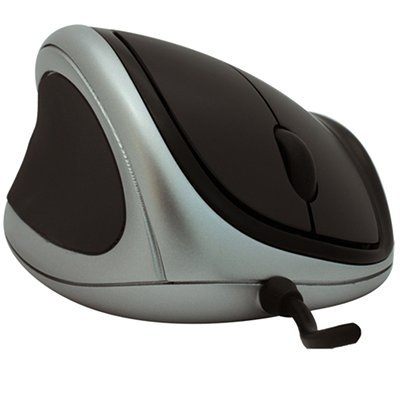
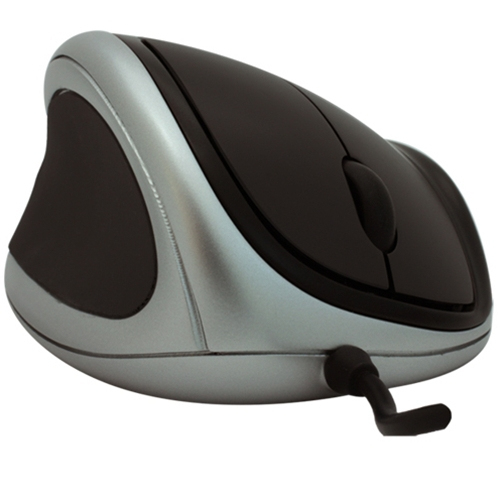
Goldtouch Ergonomic , Left mouse Office Left-hand USB Type-A Optical 1000 DPI
- Brand: Goldtouch
- Category:
- SKU: KOV-GTM-L
- EAN: 0183238000230 0808112948032 07 ...2948032 0721645129368 0132017618883 0809394594467 1832380002300 0804067309089 5057103014743 0267872406655 5050914720827 0804904112476 1320010358021more
Goldtouch Ergonomic Mouse, Left handed
Offer details
Trade Prices
| Distributor | Product | SKU | Stock | Updated | Price |
|---|---|---|---|---|---|

|
ERGONOMIC MOUSE LEFT-H USB |
2736568 |
Description
he NEW Goldtouch Ergonomic Mouse is based on the shape of the original Goldtouch Mouse, leveraging the same patented slope angles specified by ergonomists and health safety professionals
Primary changes in design: Overall size increase by approximately 10% in length, width and height
Replaced the thumb-scroll with a scroll wheel on top of the mouse
Rubberized, concave thumb area added to increase mouse control, and to support undersized and over-sized hands and fingers
Ergonomic Design
Ergonomic design supports the hand in a naturally sloping angle that places the wrist in a neutral position.
There is no need to adapt to a radically new mouse orientation to gain ergonomic benefits. Unlike mice and joysticks that require a completely vertical orientation of the hand, the Goldtouch Ergonomic mouse positions the hand and wrist in a naturally sloping angle. The user is immediately oriented to the shape and angle of the mouse, and is therefore, immediately productive.
Supports a more neutral wrist angle of 24 degrees sloping downward to the right Alleviates muscle fatigue and discomfort caused by pronation of the wrist.
As a preventative measure, the Goldtouch Ergonomic Mouse has offers health benefits to the user. Users are less likely to acquire an RSI caused by the repetitive motion of every day mousing.
As a therapeutic measure, this mouse greatly reduces wrist pronation. This is essential for sufferers of carpal tunnel syndrome, as well as other repetitive stress injuries to the wrist and elbow.
The patented forward and lateral sloping angle design reduces stress on pressure points in the wrist, and provides natural contours to support the fingers.
Increased height reduces the constant pressure on the wrist (carpals) where the base of the wrist rests against the mousing surfaces.
Over-sized buttons allow for the fingers to activate (press) without bending the fingers at the ineterphalangeal joints – reduces and alleviates arthritic discomfort.
Mouse wheel is placed forward on the mouse to minimize bending of the interphalangeal joints and provide more comfortable scrolling.
Over-sized thumb cushion helps maintain a comfortable grip for hands of every size.
Design elements of the thumb-side of the mouse are tailored to greatly reduce stress on the thumb joints in response to increasing cases of RSI related to improper and overuse of the thumb while texting and emailing from mobile phones, Blackberrys and PDA’s.
Concave and over-sized, users may find a comfortable position for mousing
Forward placement for shorter fingers
Rear placement for longer fingers
Rubber inlay proves increase grip without increasing the pressure applied by the thumb
Design elements of the front of the mouse are tailored to support the natural curvature of the fingers in a relaxed state.
The front of the mouse and the buttons slope downward and slightly outward to follow the natural contours of the fingers while at rest. The fingers rest naturally, minimizing the effort of extensor muscles of the hand. Over-sized buttons provide the maximum surface area to evenly distribute the work-force required for clicking. The forward placement of the scroll wheel minimizes the effort, bending, and movement of the fingers.
Design elements of the Top of the mouse are tailored to support the hand, wrist, and forearm in a natural position, minimizing pronation and supporting the hand in natural, at-rest position.
The patented, sloping design elevates the thumb and declines at a 24 degree angle toward the little finger. The angle of slope increases from the palm area of the mouse toward the fingers, contouring to the natural shape of the hand and fingers at rest, while providing even support throughout the palm.
Primary changes in design: Overall size increase by approximately 10% in length, width and height
Replaced the thumb-scroll with a scroll wheel on top of the mouse
Rubberized, concave thumb area added to increase mouse control, and to support undersized and over-sized hands and fingers
Ergonomic Design
Ergonomic design supports the hand in a naturally sloping angle that places the wrist in a neutral position.
There is no need to adapt to a radically new mouse orientation to gain ergonomic benefits. Unlike mice and joysticks that require a completely vertical orientation of the hand, the Goldtouch Ergonomic mouse positions the hand and wrist in a naturally sloping angle. The user is immediately oriented to the shape and angle of the mouse, and is therefore, immediately productive.
Supports a more neutral wrist angle of 24 degrees sloping downward to the right Alleviates muscle fatigue and discomfort caused by pronation of the wrist.
As a preventative measure, the Goldtouch Ergonomic Mouse has offers health benefits to the user. Users are less likely to acquire an RSI caused by the repetitive motion of every day mousing.
As a therapeutic measure, this mouse greatly reduces wrist pronation. This is essential for sufferers of carpal tunnel syndrome, as well as other repetitive stress injuries to the wrist and elbow.
The patented forward and lateral sloping angle design reduces stress on pressure points in the wrist, and provides natural contours to support the fingers.
Increased height reduces the constant pressure on the wrist (carpals) where the base of the wrist rests against the mousing surfaces.
Over-sized buttons allow for the fingers to activate (press) without bending the fingers at the ineterphalangeal joints – reduces and alleviates arthritic discomfort.
Mouse wheel is placed forward on the mouse to minimize bending of the interphalangeal joints and provide more comfortable scrolling.
Over-sized thumb cushion helps maintain a comfortable grip for hands of every size.
Design elements of the thumb-side of the mouse are tailored to greatly reduce stress on the thumb joints in response to increasing cases of RSI related to improper and overuse of the thumb while texting and emailing from mobile phones, Blackberrys and PDA’s.
Concave and over-sized, users may find a comfortable position for mousing
Forward placement for shorter fingers
Rear placement for longer fingers
Rubber inlay proves increase grip without increasing the pressure applied by the thumb
Design elements of the front of the mouse are tailored to support the natural curvature of the fingers in a relaxed state.
The front of the mouse and the buttons slope downward and slightly outward to follow the natural contours of the fingers while at rest. The fingers rest naturally, minimizing the effort of extensor muscles of the hand. Over-sized buttons provide the maximum surface area to evenly distribute the work-force required for clicking. The forward placement of the scroll wheel minimizes the effort, bending, and movement of the fingers.
Design elements of the Top of the mouse are tailored to support the hand, wrist, and forearm in a natural position, minimizing pronation and supporting the hand in natural, at-rest position.
The patented, sloping design elevates the thumb and declines at a 24 degree angle toward the little finger. The angle of slope increases from the palm area of the mouse toward the fingers, contouring to the natural shape of the hand and fingers at rest, while providing even support throughout the palm.
Specifications
| Mouse | |
|---|---|
| Purpose | Office |
| Recommended usage | PC |
| Scroll | Yes |
| Movement resolution | 1000 DPI |
| Scroll type | Wheel |
| Number of scroll wheels | 1 |
| Connectivity technology | Wired |
| Movement detection technology | Optical |
| Buttons quantity | 3 |
| Device interface | USB Type-A |
| Input device | |
| Purpose | Office |
| Recommended usage | PC |
| Scroll | Yes |
| Movement resolution | 1000 DPI |
| Scroll type | Wheel |
| Number of scroll wheels | 1 |
| Movement detection technology | Optical |
| Buttons quantity | 3 |
| Device interface | USB Type-A |
| Design | |
| Form factor | Left-hand |
| LED indicators | Yes |
| Technical details | |
| Weight | 5.11 oz (145 g) |
| Form factor | Left-hand |
| Plug and Play | Yes |
| LED indicators | Yes |
| Number of scroll wheels | 1 |
| Number of products included | 1 pc(s) |
| Connectivity technology | Wired |
| Harmonized System (HS) code | 84716070 |
| Ergonomics | |
| Plug and Play | Yes |
| LED indicators | Yes |
| Power | |
| Power source | Cable |
| Software | |
| Windows operating systems supported | Yes |
| Mac operating systems supported | Yes |
| Linux operating systems supported | Yes |
| System requirements | |
| Windows operating systems supported | Yes |
| Mac operating systems supported | Yes |
| Linux operating systems supported | Yes |
| USB required | Yes |
| Operational conditions | |
| Operating temperature (T-T) | 0 - 40 °C |
| Storage temperature (T-T) | -20 - 55 °C |
| Weight & dimensions | |
| Weight | 5.11 oz (145 g) |
| Packaging content | |
| User guide | Yes |
| Packaging data | |
| User guide | Yes |
| Other features | |
| Weight | 5.11 oz (145 g) |
| USB required | Yes |
| Number of products included | 1 pc(s) |
| Mouse dimensions (WxDxH) | 3.15 x 4.49 x 2.05" (80 x 114 x 52 mm) |
| Connectivity technology | Wired |
| Logistics data | |
| Harmonized System (HS) code | 84716070 |